
StandBy Mode: Clock & Widgets
Zetabit TecnologiaPersonalization
4.3455.00 Reviews
- Version
- 2.1.21.560
- Installs
- 1.00M
- Age Rating
- Everyone
Screenshots
Our Review of StandBy Mode: Clock & Widgets
 Analysis by Appyee
I like the idea of giving an unused phone a practical job: sitting on a desk or bedside table and showing information at a glance. StandBy Mode Pro Smart Display is built around that kind of everyday use, turning an Android phone into a clock-style display rather than asking you to reach for a separate gadget. The appeal is straightforward, but the details that matter are whether the screen is readable where you place it, whether its information feels comfortable to access, and whether the setup suits your routine.
That focus makes the app especially interesting for people who want a visible clock and a small amount of useful context nearby. I would not treat it as a replacement for every phone or smart-home feature: its value depends on having a suitable place to leave a screen on view and on being happy with what your device can show. Used with those expectations, it can make an old or spare phone feel more purposeful.
Making a phone work as a glanceable display
When I first stumbled upon StandBy Mode Pro Smart Display, I was curious. The idea of turning my phone into a smart display sounded intriguing. After downloading the app, I was greeted with a clean and intuitive interface. It's simple, no-nonsense, and straight to the point. This app is designed to make your life easier by providing quick access to essential information even when your device is on standby.
Readability and navigation at a glance
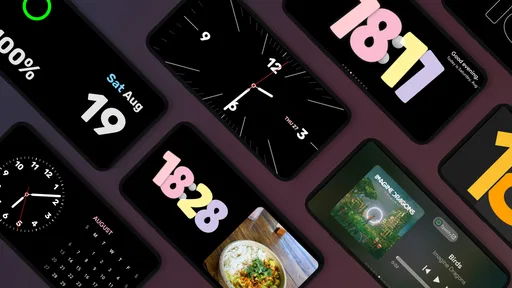
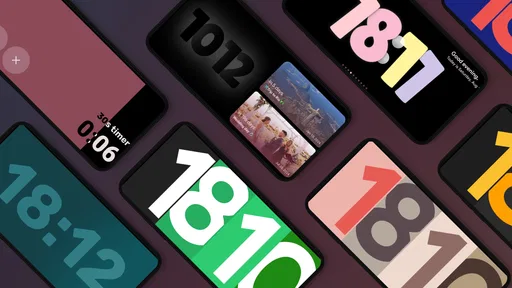
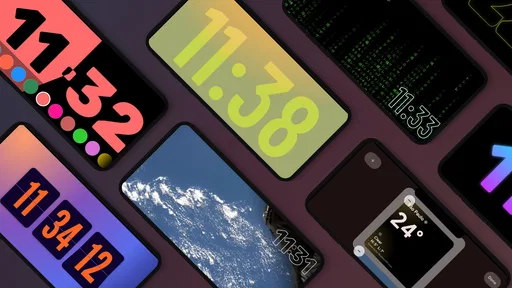
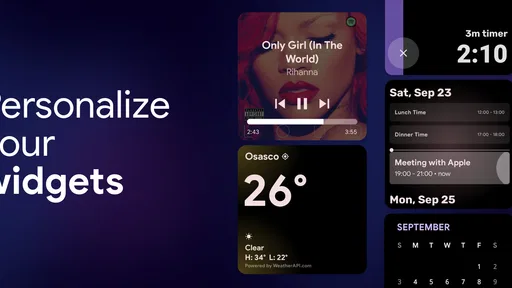
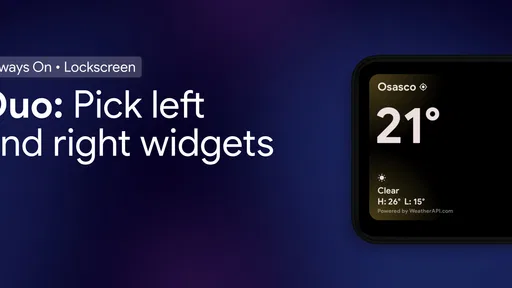
Let’s dive into what makes this app a must-have. First off, the customization options are impressive. You can tailor the display to show weather updates, calendar events, and notifications. It’s like having a mini dashboard right on your phone.
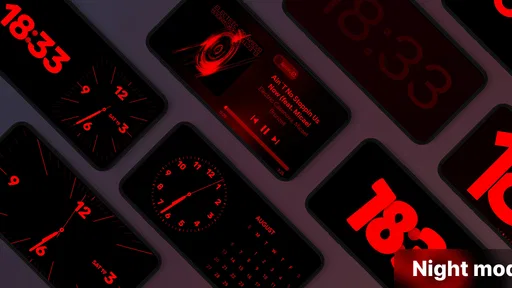
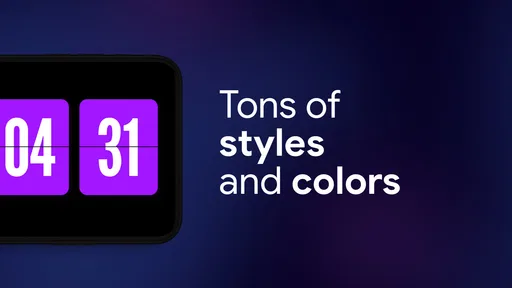
One of my favorite features is the clock display. It’s not just any clock – you can choose from various styles that suit your mood or room decor. Plus, the app is designed to be energy-efficient, so you don’t have to worry about it draining your battery while it's doing its thing.
In practice, a glanceable screen works best when I decide what I actually need to see before choosing widgets. A desk setup might benefit from the clock and calendar, while a bedside setup may be more useful with a quieter, less crowded arrangement. I would start with only the essentials, then add another item if I find myself needing it. More information is not automatically more helpful: small text and a busy layout can make a display harder to read at a distance.
The same principle helps with navigation. I’d do the initial arranging while holding the phone, when tapping and checking the result is easy, rather than trying to make changes after placing it across the room. If I use the phone in more than one location, I’d also check that the selected layout makes sense in each one; a setting that looks good at a desk may feel too bright or visually busy beside a bed.
Setup, motor comfort, and sensory needs
Setting up the StandBy Mode Pro Smart Display is a breeze. Once you download and install the app, it guides you through a quick setup process. You can select which widgets you want on display and arrange them to your liking. I found the process to be straightforward and user-friendly. Even if you’re not tech-savvy, you’ll find it easy to navigate.
Another cool thing is the app's ability to sync with your existing phone settings and apps. It pulls information seamlessly, so you’re always in the loop without needing to unlock your phone. This feature has saved me a ton of time, especially during busy mornings.
For someone who finds repeated phone handling uncomfortable, the main practical benefit is that the screen can be positioned where it is easy to see without picking the device up for every quick check. That does not remove the need to interact with the phone during setup, though. I’d make the choices in a comfortable position, set the phone securely on its stand or resting place, and avoid relying on tiny controls from an awkward angle.
Sensory comfort is personal, so I would treat the display as something to tune rather than leave on default. A bright clock or frequent visual changes can be distracting in a dark room, while a cluttered dashboard can be tiring to scan. I’d test the arrangement during the actual time and place I plan to use it, and remove anything that draws attention without helping. A bedside display should feel calm; a work display can tolerate more information if it supports the task.
Situational access: desk, kitchen, and bedside
Now, you might be wondering, how does this app perform in real life? I’ve been using it for a few weeks now, and I must say, it's incredibly convenient. Whether I’m working at my desk or cooking in the kitchen, having quick glances at my phone for updates without having to unlock it has been a blessing.
The display is clear and easy to read, even from a distance. If you’re worried about privacy, rest assured, you can customize what information shows up when your phone is on standby. It’s like having a personal assistant that respects your boundaries.
A realistic routine for me would be to leave the phone on a desk while working, use its clock as a quick time check, and glance at a calendar item before moving to the next task. In the kitchen, a glance can be useful when my hands are occupied, but I would place the phone away from splashes and heat and make sure it cannot be knocked down. At night, I would be more selective: a clock may be enough, while notifications could interrupt the calm I want in a bedroom.
Those settings also make a difference in shared spaces. If other people can see the screen, I’d choose carefully which notifications or calendar details appear there. The ability to customize visible information is useful, but it still calls for a deliberate privacy check whenever the phone’s location changes. I would not assume that a layout suitable for a private desk is automatically appropriate for a kitchen counter or bedside table.
Compared with a basic clock app, this offers a more customizable display with room for glanceable information. Compared with buying a dedicated bedside clock or smart display, it makes use of a phone you already own, but the experience depends on that phone being available and positioned well. A phone that must stay in your hand, or whose screen is uncomfortable to keep visible, is better served by a conventional clock. Likewise, anyone looking for a hands-free voice assistant should choose a product designed for that role rather than expect this app to provide it.
Remaining barriers and practical trade-offs
In terms of performance, the app runs smoothly without any noticeable glitches. It updates in real-time, ensuring that the information displayed is always current. I also appreciate the lack of intrusive ads, which is a rarity these days and makes the experience much more pleasant.
What really sets StandBy Mode Pro Smart Display apart is its ability to blend functionality with aesthetics. It’s not just about utility – it’s about making your phone a part of your living space, enhancing both style and efficiency.
The trade-off is that the phone itself becomes part of the setup. I would check that its screen remains easy to view from the intended spot and that keeping it there does not interfere with my normal use. Even an attractive display is not helpful if I need the device elsewhere, or if I find myself repeatedly walking over to read information that could be placed closer. A spare phone is a more natural fit than the only phone I rely on throughout the day.
There is also a difference between information being visible and information being accessible. A visual clock and widgets help when I can comfortably see the screen, but they are not a substitute for another way of getting information if vision, glare, viewing distance, or the room’s lighting makes the display difficult. I would test the phone from the chair, bed, or work position I actually use, not only while holding it in my hand. If it is hard to read there, changing the layout or choosing a larger dedicated display may be the better answer.
Another sensible check is whether the screen’s presence suits the room. A continuously visible phone may be convenient for one person and an unwanted source of light or distraction for another. I would try the arrangement during a normal evening and morning before making it a permanent bedside habit. If that visual presence does not work for the household, a standard clock with a simpler display is likely the more comfortable choice.
Pricing is also worth weighing against how often the app will be used. It is free to install, while in-app purchases range from $0.99 to $54.99 per item. I would begin with the free experience and decide whether the display has become part of my routine before spending anything. That keeps the decision practical: the app is most valuable when it solves a repeated need, not merely because a customizable clock looks appealing on the first day.
Who will benefit, and who should look elsewhere
I’d recommend trying it if you already have an Android phone you can leave in one place, want a clock that can also show selected information, and prefer adapting a screen to your room over buying another device. It may also suit someone who likes checking a calendar or notifications without unlocking the phone, provided the information is comfortable to read and appropriate for the setting.
I would skip it if you need the phone constantly, dislike having a lit screen nearby, or want a purpose-built display with a fixed, simple interface. It is also not the right choice if you expect every detail to be readable from across a large room; placement and the phone’s own screen matter. For users who prefer tactile controls, audio prompts, or fewer visual elements, a physical clock or another suitable device may be a better match.
StandBy Mode Pro Smart Display is a free personalization app from Zetabit Tecnologia. It has a 4.5 average from around 28,000 ratings, and more than one million installs. It is rated for Everyone, with version 1.8.13.483 listed for Android 7.0 and later. Those details make it easy to see why people try it, but I’d judge it by fit: a clean clock and selected widgets are useful only when they work for your phone, your space, and your way of accessing information.
An inclusive verdict for everyday use
So, if you’re someone who loves staying organized and getting the most out of your device, I’d highly recommend giving this app a try. It’s available for download on both Android and iOS, making it accessible to a wide audience.
In conclusion, StandBy Mode Pro Smart Display is more than just an app. It’s a tool that transforms your phone into a powerhouse of information and style. Whether you’re a tech enthusiast or someone who just loves gadgets, this app is definitely worth checking out.
Ready to give your phone a smart makeover? Download the app today and see the difference for yourself!
Verdict
Strengths of StandBy Mode: Clock & Widgets
- Customizable widgets enhance usability.
- Integrates seamlessly with smart devices.
- Energy-efficient, reducing power usage.
- User-friendly interface for easy navigation.
- Real-time updates keep information current.
Limitations of StandBy Mode: Clock & Widgets
- Limited device compatibility may restrict use.
- Requires Wi-Fi for optimal performance.
- Free version includes ads.
- Occasional lag in high-demand features.
- Customization options can overwhelm new users.
Similar Picks in This Category
View All
Microsoft SwiftKey AI Keyboard
SwiftKey4.3

Wallpapers
Google LLC4.1

Zedge™ Wallpapers & Ringtones
Zedge4.7

Yandex Browser with Alice AI
Direct Cursus Computer Systems Trading LLC4.3

Ringtone Maker:create ringtone
Big Bang Inc.4.7

Fonts Keyboard
Fonts Keyboard3.9
Frequently Asked Questions
What is StandBy Mode Pro Smart Display?
StandBy Mode Pro Smart Display is an innovative app designed to transform your mobile device into a dynamic smart display when it's not in active use. It offers customizable widgets, notifications, and real-time updates, ensuring you stay informed without unlocking your phone. Ideal for users seeking enhanced functionality and convenience.
How does StandBy Mode Pro Smart Display affect battery life?
StandBy Mode Pro Smart Display is optimized to minimize battery consumption by using efficient background processes and low-energy settings. While it does add some additional drain compared to a completely idle screen, most users find the trade-off for enhanced features and utility worthwhile. Users can adjust settings to balance performance and battery life.
Is StandBy Mode Pro Smart Display customizable?
Yes, StandBy Mode Pro Smart Display offers extensive customization options. Users can choose from a variety of widgets, themes, and display styles to personalize their experience. Whether you prefer a minimalist look or a feature-rich interface, the app provides flexibility to match your preferences and needs.
Does StandBy Mode Pro Smart Display support third-party integrations?
StandBy Mode Pro Smart Display supports several third-party integrations, allowing users to connect with popular apps and services for seamless notifications and updates. This feature ensures you can access information from your favorite apps directly on your smart display, enhancing convenience and productivity.
Is StandBy Mode Pro Smart Display available on both Android and iOS?
Yes, StandBy Mode Pro Smart Display is available for both Android and iOS platforms. The app is designed to offer a consistent and user-friendly experience across different devices, ensuring that users of either operating system can enjoy its full range of features and benefits.
